Ultra-Light 8K Wireless Gaming Mouse: Polling & Setup Tips
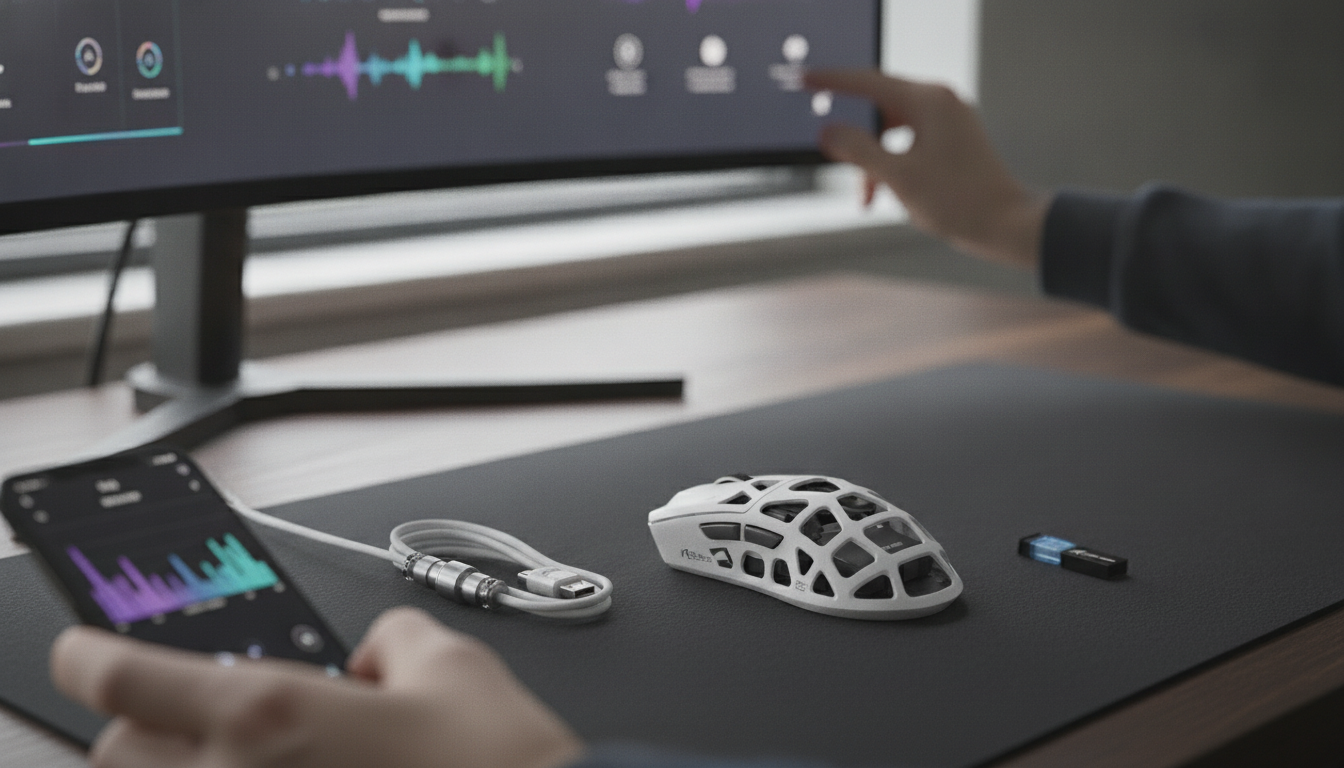
Ultra-Light 8K Wireless Gaming Mouse: Speed, Control, and Comfort Without the Cable
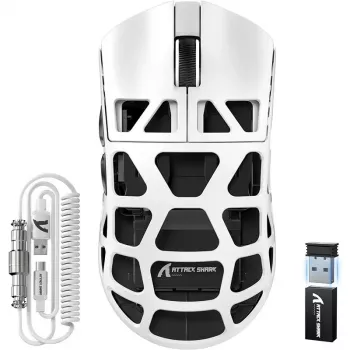
An ultra-light wireless mouse with an 8K polling option is built for fast flicks, consistent tracking, and a clean setup. The biggest wins usually show up in how the mouse feels after hours of play: easier micro-corrections, smoother repositioning, and less “drag” from both weight and cable. Below is a practical breakdown of what the “8K” spec changes, how ultra-light weight affects fatigue and control, and which settings help balance performance with battery life.
Featured In-Stock Picks
- Ultra-Light 8K Wireless Gaming Mouse — $70.01
- Full-Length Floor Mirror with Stand — $222.97
- Artificial Boxwood Spiral Topiary Plant — $89.17
What “Ultra-Light” Changes During Long Sessions
Ultra-light mice aren’t just about “feeling fast” on day one. Over weeks of ranked ladders, aim training, and long scrim nights, the reduced mass can change how consistent your mechanics stay from the first match to the last.
- Lower hand and wrist fatigue: A lighter shell typically reduces strain during repeated swipes, micro-corrections, and long practice blocks. Less effort per movement can help keep form stable when you’re tired.
- Faster stops and starts: With less inertia, it can be easier to decelerate precisely—useful for tight tracking, quick counter-strafing corrections, and clean flick stops.
- More consistent lift-off and re-centering: Low-sensitivity players who frequently reposition often prefer how a lighter mouse lifts and sets down with less wobble.
- Grip and stability still matter: Shape, coating, and button placement can outweigh raw weight if the mouse doesn’t “lock in” to your natural grip style (claw, fingertip, or palm).
8K Polling Rate Explained (and When It Helps)
Polling rate is how often your mouse reports its position to your PC. 8K polling means up to 8000 reports per second, compared with the 1000Hz (1K) standard on many gaming mice. In simple terms, higher polling increases the cadence of input updates your PC receives.
- Where it can feel better: Very fast swipes, high-refresh monitors, and situations where smoother cursor updates feel more immediate—especially in aim-heavy shooters.
- Diminishing returns are normal: Many setups feel nearly identical between 1K and higher rates during everyday play, especially at moderate hand speed.
- Trade-offs: Higher polling can increase CPU overhead in some games and can reduce battery life on wireless. For many systems, 2K–4K is a practical middle ground.
Polling Rate at a Glance
| Setting | Reports per Second | Typical Feel | Common Trade-Offs |
|---|---|---|---|
| 1000Hz (1K) | 1000 | Responsive and widely supported | Lowest overhead, best battery |
| 2000Hz (2K) | 2000 | Slightly smoother updates on fast motion | Small overhead increase |
| 4000Hz (4K) | 4000 | More noticeable for high refresh + fast swipes | Higher overhead, more battery drain |
| 8000Hz (8K) | 8000 | Maximum update cadence for compatible setups | Most overhead, shortest battery |
For a bit of background on how HID devices communicate with computers, the USB Implementers Forum provides a useful overview of HID basics: USB HID (Human Interface Device) Overview. And for a broader look at end-to-end latency concepts (beyond just mouse polling), NVIDIA’s materials on measurement can help frame what changes are actually perceptible: NVIDIA Reflex: System Latency and Measurement.
Wireless Performance: Latency, Stability, and Interference
Modern 2.4GHz gaming receivers can feel extremely close to wired—when the setup is right. If wireless ever feels “off,” the cause is often environmental rather than the mouse itself.
- Use the low-latency receiver mode: A dedicated USB receiver typically outperforms standard Bluetooth for competitive play.
- Keep the receiver close: A front USB port or included extender reduces dropouts caused by distance and desk-level interference. A few inches can matter more than people expect.
- Manage 2.4GHz congestion: Routers, some headsets, and other dongles can crowd the same spectrum. Re-positioning the receiver (or moving it away from a USB 3.0 hub) often fixes intermittent stutter.
- Use wired as a baseline: If the mouse supports both modes, wired play can help confirm whether an issue is wireless interference, settings-related, or game-side.
Sensor Tracking and Lift-Off Behavior
Ultra-light is only a benefit when tracking is steady. A strong gaming sensor should maintain consistent movement without acceleration, angle snapping, or jitter across normal DPI ranges.
- Consistent tracking matters more than headline DPI: The best feel comes from stability at your real DPI and in-game sensitivity, not from extreme top-end numbers.
- Lift-off distance (LOD) affects resets: Lower LOD helps low-sens players who lift frequently, reducing cursor drift during repositioning.
- Mousepad choice changes everything: Cloth pads often feel steadier and more controlled; hard pads can feel faster but may amplify micro-vibrations during fine aim.
- Use surface tuning if available: If software supports calibration, match LOD and surface settings to your pad for repeatable muscle memory.
For a more standardized perspective on how mice are evaluated across tracking, latency, and consistency, see: RTINGS Mouse Testing Methodology.
Shape, Grips, and Button Feel
Battery Life and Practical Settings
Who This Mouse Fits Best
FAQ
Does 8K polling rate improve aim for everyone?
No—benefits depend on monitor refresh rate, game engine behavior, CPU headroom, and how fast you move the mouse. Many players prefer starting at 2000–4000Hz and only switching to 8000Hz if performance stays stable and the feel is clearly better.
Why does wireless sometimes feel inconsistent compared to wired?
Receiver distance, USB port choice, 2.4GHz interference, and low battery can all cause stutter or missed inputs. Moving the receiver closer with an extender and testing in wired mode are reliable ways to isolate the cause.
What polling rate is a good default for daily play?
1000Hz is a safe baseline with broad compatibility and strong battery life. If you use a high-refresh monitor and everything stays smooth, 2000–4000Hz can be a practical upgrade, while 8000Hz is optional if the battery impact and any overhead are acceptable.














Leave a comment