

15W Magnetic iPhone Charging Stand for Everyday Docks
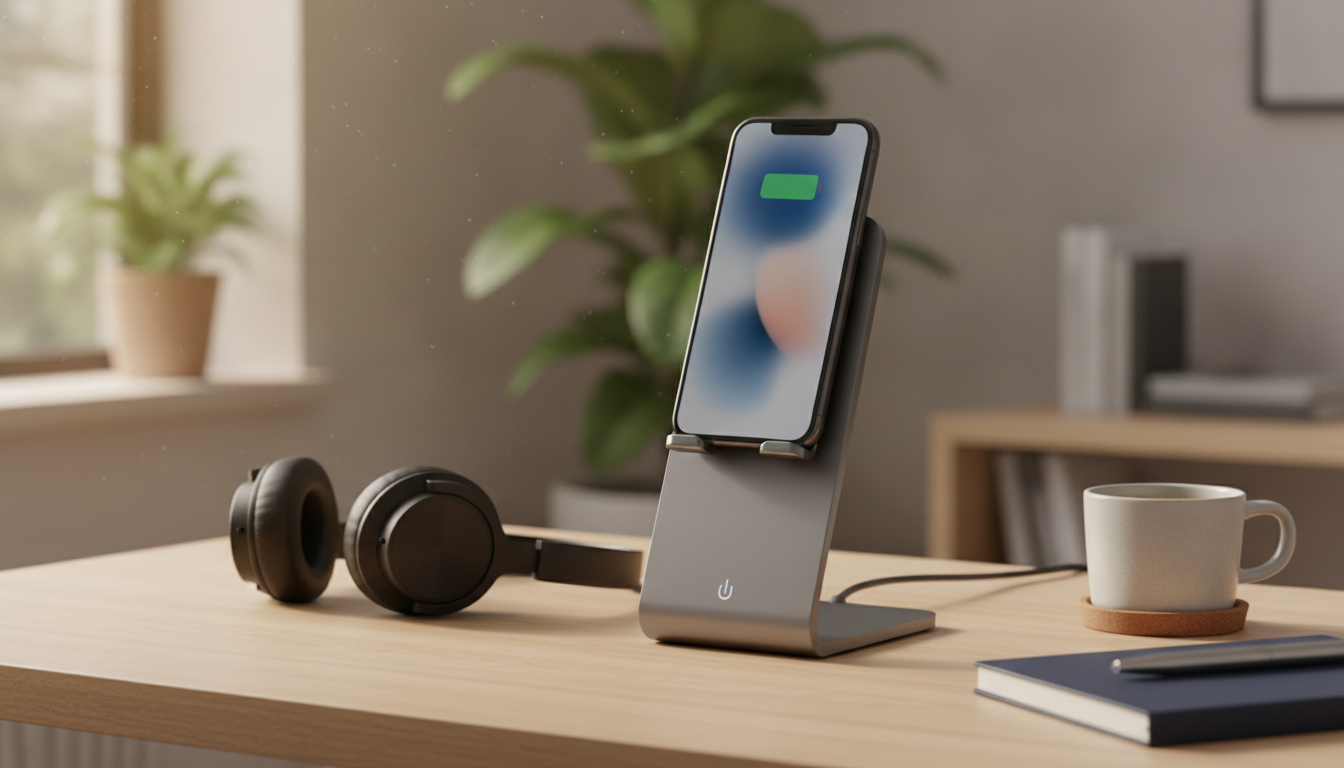
Magnetic Wireless Charging, Made Simple for Daily iPhone Use
A magnetic wireless charging stand is built for the moments when plugging in a cable feels like one step too many—at your nightstand when the lights are off, at your desk between meetings, or on the kitchen counter while a timer is running. By using magnetic alignment to help the phone land in the “sweet spot,” a 15W wireless dock can deliver more consistent charging while keeping the screen upright, readable, and easy to unlock with Face ID.
If you’re looking for a compact, routine-friendly setup, the Magnetic Wireless Charger Stand 15W Fast Charging Dock for iPhone is designed to act like a drop-in home base: set the phone down, let the magnet guide alignment, and get back to what you were doing.
What this charger stand is made to do
- Hold the iPhone in a consistent charging position with magnetic alignment that reduces the “slid off the pad” problem common with flat wireless chargers.
- Keep the display at a comfortable viewing angle for quick notification checks, video calls, or timers—without laying the phone flat.
- Support fast wireless charging up to 15W (real-world speed varies by iPhone model, case thickness, and the power adapter used).
- Work as a daily dock so you’re not repeatedly inserting a cable into the phone’s port, helping reduce wear from constant plug/unplug cycles.
For background on magnetic attachment behavior and iPhone support, see Apple Support: About MagSafe for iPhone.
Best everyday use cases
Nightstand charging
Dock the phone upright so time, alarms, and notifications stay easy to read. Magnetic alignment is especially helpful when you don’t want to fumble with a cable in the dark.
Desk setup
Keep your workspace cleaner by charging without a loose cable draped across your desk. An upright screen angle also makes it easier to catch meeting alerts and messages at a glance.
Kitchen counter convenience
Use the stand as a charging spot while following recipes, starting timers, or taking hands-free calls. Since the phone stays visible, you’re less likely to miss an important notification.
Travel packing
One stand paired with a compact USB-C power adapter can reduce cable clutter. It’s also easier to set up in a hotel room when you want a stable “drop zone” for the phone.
Charging performance and what affects speed
Wireless charging speed isn’t only about the stand’s rating. The adapter you use, how well the coils line up, and even ambient temperature can all change what you see on the screen.
- Power adapter matters: An underpowered or low-quality adapter can bottleneck charging, leading to slower speeds or charging that starts and stops.
- Alignment matters: Magnetic positioning helps keep the charging coils centered for steadier performance and often less wasted heat.
- Case thickness matters: Very thick cases, wallet attachments, or metal accessories can weaken the magnetic hold and reduce efficiency.
- Heat management matters: Wireless charging naturally produces warmth. Better ventilation and a hard surface can help the phone maintain speed.
- Battery behavior is normal: iPhone may slow charging near 80–100% or when warm to protect battery health.
| Factor | What to expect | Quick fix |
|---|---|---|
| Underpowered adapter | Slower charging or intermittent start/stop | Use a reputable adapter with sufficient output |
| Misalignment | Phone charges but runs warmer and slower | Let the magnet snap the phone into place |
| Thick case or accessories | Weaker magnetic hold and reduced charging efficiency | Remove bulky cases, metal rings, or wallet attachments |
| High ambient heat | Charging may throttle to protect the battery | Move to a cooler spot and avoid direct sunlight |
| Background activity | Battery percentage increases more slowly | Pause heavy tasks (gaming, navigation) while charging |
For a deeper overview of the Qi wireless charging standard (the underlying system many chargers rely on), visit the Wireless Power Consortium: Qi Standard. For iPhone charging behavior and battery protection features, see Apple Support: About optimized battery charging.
Compatibility notes for iPhone and cases
- Magnetic alignment works best on iPhones built for magnetic attachment; older or non-magnetic models may still charge wirelessly but can be easier to knock off-center.
- Magnetic-compatible cases typically offer the most stable hold. Standard cases can still work if they’re thin and don’t interfere with the charging area.
- Avoid placing magnetic strips or RFID items between the phone and charger, and keep credit cards away from strong magnetic contact points.
How to set it up for reliable daily charging
Safety, care, and long-term use
What’s included and key specs to confirm before buying
Related in-stock picks for a cleaner setup
- Magnetic Wireless Charger Stand 15W Fast Charging Dock for iPhone — a simple upright dock that helps keep charging alignment consistent.
- Full-Length Floor Mirror with Stand — a practical bedroom addition that pairs well with a tidy nightstand charging spot.
- Artificial Boxwood Spiral Topiary Plant — an easy way to add a clean, decorative touch to a desk or entry table near your charging station.
FAQ
Will it charge through an iPhone case?
In most cases, yes—thin cases usually work well. Very thick cases, metal plates, or wallet attachments can weaken the magnetic hold and may slow or prevent charging.
Do you need a specific wall adapter to get 15W charging?
A capable, reputable wall adapter is typically needed to reach higher wireless charging speeds. If the adapter is underpowered or inconsistent, charging may be slower or may cut in and out.
Why does charging slow down near full battery?
It’s normal for iPhone to reduce charging speed near 80–100% and when the device warms up. This behavior helps protect long-term battery health.















Leave a comment