Travel Folding Mouse: Silent Bluetooth + 2.4G Control
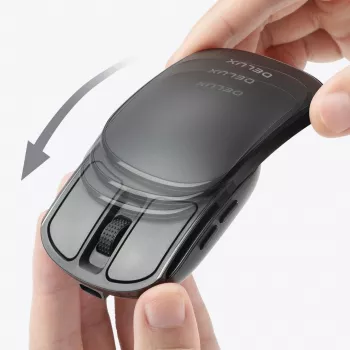
Wireless Folding Pocket Mouse: Silent, Ultra-Light Control for Travel and Hybrid Work
A folding pocket mouse is built for people who move between desks, cafés, planes, and meeting rooms—where trackpads feel cramped and full-size mice take up too much space. This guide breaks down what to expect from a Bluetooth/2.4G folding mouse, how it fits different devices and workflows, and the practical details that matter day to day.
What Makes a Folding Pocket Mouse Different
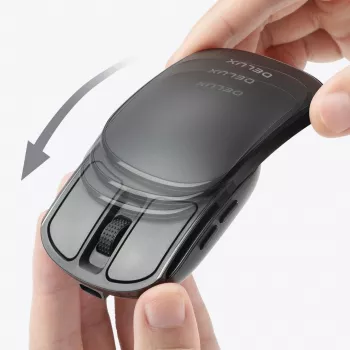
A folding pocket mouse is essentially a travel-first design: compact when packed, functional when opened, and easy to slip into the same sleeve or pouch as a laptop. The folding design reduces bulk in a laptop sleeve, tech pouch, or jacket pocket and can help protect the buttons and scroll area while packed.
Most models aim for ultra-light portability rather than heavy, desk-anchored stability. That tradeoff is usually ideal for short sessions, travel days, and compact workspaces (like a café table or airplane tray), but it can feel less “planted” than a heavier office mouse.
Another major difference is silent click switching. Quiet switches reduce noise in shared spaces like libraries, co-working areas, classrooms, and late-night home use. Silent clicks typically reduce the sharp “snap” of a click rather than eliminating all noise—scrolling and surface contact can still be audible depending on the desk or mouse pad.
Finally, dual wireless options (Bluetooth plus a 2.4G USB receiver) add flexibility across laptops, tablets, and desktops—useful when one connection method is restricted or inconvenient.
Connectivity Options: Bluetooth 5.2 vs 2.4G Receiver
Bluetooth 5.2 pairs directly with compatible devices and frees up USB ports—especially useful for thin laptops and tablets with limited connectors. For reference on Bluetooth standards, see the Bluetooth Core Specification.
A 2.4G USB receiver is often the quickest plug-and-play option on desktops and older laptops. It can also be simpler in locked-down corporate environments where Bluetooth pairing is restricted. Switching between Bluetooth and 2.4G is a practical fallback when Bluetooth is unstable, occupied by other peripherals, or blocked by policy.
For travel, treat the receiver like a key: keep it in a dedicated pouch pocket (or attached to a dongle case) so it doesn’t disappear into the bottom of a bag.
| Feature | Bluetooth 5.2 | 2.4G USB Receiver |
|---|---|---|
| USB port needed | No | Yes |
| Best for | Tablets, ultrabooks, multi-device carry | Desktops, quick setup, older systems |
| Typical setup | Pair in device settings | Plug receiver and use |
| Good fallback when | USB ports are limited | Bluetooth is restricted or unreliable |
Silent Clicking: Where It Helps Most
Quiet switches make the biggest difference in places where every small sound carries. In meeting rooms, silent clicking reduces audible tapping during calls and presentations. At night, it’s less disruptive around sleeping family members or roommates. In public spaces, it keeps a lower profile in quiet environments.
Keep expectations realistic: “silent” usually means dramatically reduced click noise, not total silence. A textured mouse pad can add friction noise, and some scroll wheels are louder than the primary buttons.
Comfort and Control in a Pocket-Size Mouse
Comfort is where pocket-size devices feel most different from full-size office mice. Compact mice often favor fingertip and claw grips; if you’re used to a full palm grip—especially with larger hands—your hand may feel more cramped. The folded shape can also change your wrist angle, and a short adjustment period is normal.
If you need help enabling Bluetooth on common platforms, official setup guidance is available from Microsoft’s Bluetooth in Windows support and the Apple iPad guide to connecting Bluetooth devices.
Portability Details That Matter
Device Compatibility and Setup Checklist
Product Snapshot: Wireless Folding Pocket Mouse (Bluetooth 5.2 + 2.4G)
If your priority is a compact, travel-friendly mouse that still works across a mix of devices, the Wireless Folding Pocket Mouse Bluetooth 5.2 2.4G Silent Ultra-Light Portable is built specifically for on-the-go use. Its folding body stores easily in compact carry setups, and dual wireless support helps you move between modern tablets and USB-based computers without changing your routine.
| Item to check | Why it matters |
|---|---|
| Wireless modes (Bluetooth/2.4G) | Ensures it works with both tablets and USB-based computers |
| Receiver storage | Reduces chance of losing the dongle during travel |
| Charging/battery approach | Affects how often it needs topping up and what cable you carry |
| Noise level | Important for meetings, libraries, and nighttime use |
Other Handy Add-Ons for Travel and Hybrid Setups
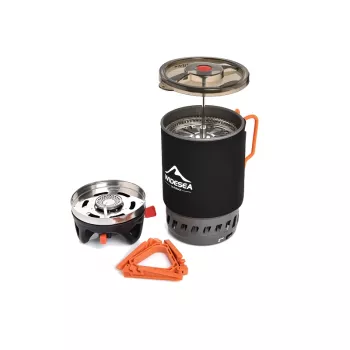
- portable-camping-cooking-system-with-heat-exchanger-and-gas-stove for car camping and travel days when you want a compact cooking setup.
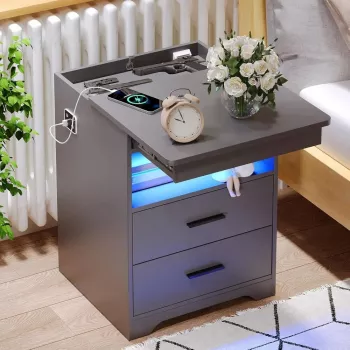
- modern-nightstand-with-hidden-gun-drawer-usb-type-c-charging-led-sensor-light for a home base that adds convenient charging near your main workstation.
Who It’s Best For (and Who Should Skip It)
FAQ
Can a Bluetooth folding mouse work with a tablet?
Yes—many tablets support Bluetooth mice, especially on iPadOS and Android. Confirm your tablet OS supports pointer devices and adjust pointer speed and scrolling to match your preference; 2.4G can also work if you have the right USB adapter.
Is a silent mouse completely noiseless?
No. Silent switches usually reduce click sound significantly, but scrolling and the mouse sliding on a desk or pad can still be audible depending on the surface and environment.
When should 2.4G be used instead of Bluetooth?
Use 2.4G when you want plug-and-play reliability, you’re on a desktop or older system, Bluetooth pairing is inconvenient, or Bluetooth is restricted. Just make sure you have an available USB port (or an adapter/hub if needed).













Leave a comment